Monday, March 4, 2013

8 things to learn from the internet: Part II

Last time: 

I introduced some of the top tips I learned working as an information architect in Silicon Alley.

My top 3 tips had to do with what to teach. 


Tip #1 from the Web: Who is your audience?

Tip #2 from the Web: Less is More

Tip #3 from the Web: Categorize

These tips are still not enough to ensure that students will get what we want from a lesson. Teachers need to also worry about how their presentations look.

I wasn't hired to be graphic designer, why worry so much about how to present information?

Have you ever spent hours preparing a shiur, and then, at the last minute,  given out a list of sources copied straight from the Bar Ilan CD-Rom?  As the students scan the sheet, their eyes glaze over, and you spend the rest of your time trying to get them re-engaged in your carefully planned lesson. 

When we don't think about how we present our information visually, we end up trying to entertain our students to hold their attention. With a little tweaking of how our  worksheets and lessons look, we can make learning and teaching much easier and more fun.


These suggestions are pretty standard in information design. Keep your eyes open when you look around the web for examples you can copy. 


Tip #4 from the Web -  Use both Pictures and Words!


People learn from text and they learn from pictures. They learn from each using different parts of the brain. When both pictures and words are used at the same time, learning time is cut in half! 

On the web, this has led to an explosion of graphics and icons.As teachers, we should not underestimate the power of the graphic to explain information. 
  • Illustrate a pasuk on the board rather than just using words. 
  • Draw the translation of a shoresh. 
  • Think of icons to represent abstract concepts.  
  • Use graphic organizers. 
Using all the tools available helps every student learn.

I teach Pirkei Avos. When students have to spend time thinking about the translation of the text, they are apathetic, and I am the one left analyzing the text. At the end of the day, they don't enjoy the fun of learning, nor do they learn the translation. 

Simple pictures change this dynamic. I give them an illustrated mishna, created with davkawriter and clip art from http://www.clker.com/ The class uses the pictures to help them think about the mishna, and they become active learners rather than passive.  

Tip #5 from the Web -   Write Visually


When I worked in web design,  I learned that I needed to write differently than I would writing papers for school. I needed to worry about how my words appeared on the page as much as what they said. 

Web readers scan  text rather than reading it carefully.  As a result, there are best practices for writing for the web that we can use when we are trying to give over information quickly. 

This list, taken from usability.gov,  can help teachers create innovative materials that help students learn. 

On the web (and hopefully in your class)

  • Information is bulleted or numbered
  • Sentences are short.
  • Paragraphs are short. Only 2-3 sentences long. At the most.
  • Thereare tablesto organize information
  • There are headings and subheadings
  • The fonts for headings are bigger and different than the fonts for the information text.
  • Important words are bolded or italicized
  • Color is used to indicate meaning
  • There are lots of pictures and diagrams.
  • There is space between paragraphs to help chunk the information

Try these techniques out on your board and your handouts.   You will find that using one or two of these suggestions really transforms your boring handouts to make them look engaging and professional. 

Tip #6 from the Web - Make it personal.

http://www.flickr.com/photos/asam/
People are drawn to faces. People like social interactions. Websites are full of faces because it engages us and keeps us on a website longer. 
We all have digital cameras, ipods, iphones, and tablets. We can take pictures any time of the day and use them the next day with the press of the button. Use your students in your curricular materials and lessons whenever you can.

My co-teacher has  pictures of our  students on all of her bulletin boards.  Kids from the whole school study these bulletin boards over and over again. What makes these different then other bulletin boards? The faces make it personal in a way that nothing else can. 

Using real pictures of your students is a very cheap way to get them motivated.

Tip #7 from the Web - Perception is king

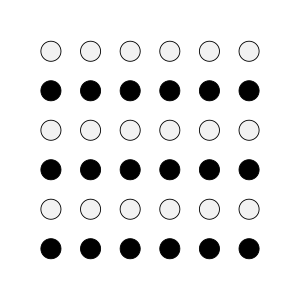
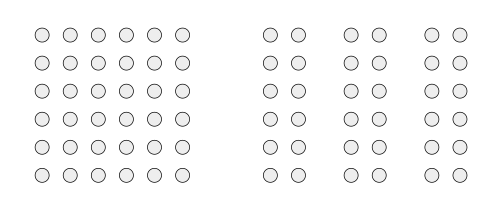
Gestalt Psychology has a rule that the mind wants to organize things for meaning. In the following 2 pictures, there are 36 circles. By changing some colors and by changing the spacing your mind sees groups.
For example, by changing colors, you now see 6 rows of circles rather than a square of 36 circles.

In this example, by putting space between sets of circles, your mind now sees 3 columns instead of the square. 
On websites, designers use Gestalt Psychology to create sections by using white space, different fonts, or colors.

As teachers, if we want to reinforce that two things are similar,  we should put them close to each other on a page, connect them using lines, or use the same color and  font.  

We should also keep some part of our papers and lesson blank. White space, the use of nothing, is one of the best tools there is to convey information and meaning.

Tip #8 from the Web -  Provide a Map

People relax when they know 
  • where they are, 
  • how they got there, 
  • and where they are going. 

 On websites, there is always navigation so you can get back to where you started. There are also headers that show the trail you took to get to a page. Companies realize that by making sure I know where I am on their website, I will be calmer and may buy more. 

Can you look at the two webpages below and figure out how I found my arts & crafts supplies on these two websites? 

Example 1: Would you expect to find School Supplies in Electronics? 


or Example 2: Would you expect to find School Supplies in the Toy Section?


Where would you go shopping again, all things being equal?

I would most likely shop in the place where I knew could find what I need without having to think too much.

When we teach, we must provide maps of where information belongs. Otherwise, students will get frustrated and may never give us another chance to reach them.

How do we provide navigation for students? On websites, every page has a header and a section. Similarly, all of our papers need to be labeled so students clearly see where they belong. Every page should include page numbers, a title, and it's category - such as notes, quiz, worksheet etc. 

Navigation also applies to how the lesson unfolds. We need to have a clear progression in our lessons so students understand how the lesson was developed so that they  can recreate the logic independently. 

Summing up:

Teaching and lesson planning doesn't end with having great content. Presentation matters just as much.  After you make a handout or write on the board, take a look at your work and ask the following questions.

What to include
1. Who am I making this for?
2. Can I leave out any information?
3. Have I categorized information when possible?

How to include it
4 Am I maximizing  both visual and auditory learning?
5. Did I write briefly and visually?
6. Is it personal? Can I include photographs to make it more meaningful?
7. Is it organized using headings and principles of proximity and similarity (color, size, shape)
8. Have I provided context and a way to navigate the information independently? 
By keeping these principles of good web design in mind, you will improve your lessons dramatically.

Next time . . . 

Pesach is coming and I am really psyched. No, the reason is not because I I love spending  four weeks scrubbing my house. The real reason I am excited is that Pesach, the holiday of educating of our children, is the perfect model for how to teach and learn in the best possible way every day of the year. Next time, we are going to explore how to use the model of the Pesach seder to transform our classrooms and make our classes fresh and meaningful all year long. 

See you on March 20

Cross posted to Chinuch Energy   YU 2.0  YUHS Chinuch Community

Thursday, February 21, 2013

Megillas Esther in Rashi Script - a very successful program for increasing fluency in Rashi

I have had such a great experience with my Megillas Esther reading program this year that it merited an immediate blog post.

This year, I have been spending daily class time having the students read aloud using the DEAR (Drop Everything and Read) model explained here  where they read to a friend and the friend checks them for errors and times them to improve their hebrew reading fluency. The class average is around 50 words a minute which is quite good.  I have used the read for speed worksheets on the parsha and made my own for tefillos so that  students develop sight words that they will use when davening and learning as they read to each other for 1 minute daily. We use Clock Buddies (sample Clock Buddies Worksheet) to make sure that there is a rotation of partners.

This year, I also taught rashi script in a fun and engaging way as described here . Homework involved copying over Rashi script into neat Hebrew script. I check letter formation to make sure that the 3rd graders aren't forming letters improperly (HUGE PET PEEVE) and that the students know the confusing letters in an unknown context.

So basically, my students have been reading a lot of hebrew and practicing a lot of Rashi script.

This time of the year we combine it all. On Monday, I sent home the megillah in Rashi script. The students have two weeks to read the megillah to their parents with no mistakes. The best part of this is that so many parents know the megillah by heart that the parents are actually letting the kids read to them for as long as they want. Students are reading 1, 2 or 3 perakim a night. Plus, they plan to bring their megillah to shul and follow along as the baal korei reads. What could be better???

The parents have been blown away by how well the students can read and that they are not afraid of Rashi. They also love that the kids can do their reading homework without the parent being tied next to them to follow along. The kids are loving that they have their parents undivided attention for extended periods of time and that their parents know everything because they can correct them without looking inside. Plus, they love reading in Rashi script because it is new and different.

If you are trying to improve students' reading in Rashi, I would definitely build up to this kind of program.


Saturday, February 16, 2013

Chinuch Energy!: 8 things to learn from the internet: Part I

Featured Blog: Chinuch ENERGY!

Do you remember when you learned how to use the internet? I don't. Why not? If we can figure out the answer, we can create lessons that our students won't remember having to learn as well.


We don't remember how we learned to use the internet because companies designed websites so the process would be painless.   Here is a blog post that has screenshots with comparisons of old and current websites. Take a look at a list of the most popular websites in 1998. The old websites that were harder to use disappeared or were changed to what we know today.

In 1998, I took a Cognitive Psychology course with Rabbi Dr. Aaron Hersch Fried as part of a BA-MS Program for Azrieli, graduated Stern College for Women, and got my first real job at a cutting edge web design shop.


My first assignment was web programming.  As I programmed, I realized that  my Cognitive Psychology course was very relevant to the design of the website functionality.  I was quickly transferred to the Information Architecture department where I worked with executives to define how we would present information on their websites. 


Soon, most websites started incorporating cognitive psychology principles into the design of their websites.  Web designers discovered that if users needed to work hard, they would leave. So web designers  used simple techniques to ensure that users could click on the right place without thinking.


So what does this have to do with teaching?  Corporations used educational theory as a backbone for web design. As educators, we can look at websites and figure out how to help our students learn.


Like web designers, all teachers  present information to users. We design smart board lessons, write on the board and hand out work sheets. We need to think about whether the way we present information is contributing to student learning or to their cognitive overload. We should use basic principles of design in our classroom so the working memory is available for processing and memory storage rather than being occupied wading through useless information.


There are two areas that we can learn from web design.


 1) What information we present (AudienceScopeCategories)

and then 


 2) how we present it.  

This is an extensive topic, so we will get our feet wet by discussing the first half this week.

What information to present

1. Know your audience
http://www.flickr.com/photos/terrapin_flyer
Information architects define the people  for whom they are designing a websites. I worked with one organization whose audience was defined as people undergoing life changes. Anything that was added to the site had to serve the needs of divorcees, college students or first time parents,

For teachers, we need to tailor our lessons to the people in front of us.


  • Is it really possible for curricular materials to meet the needs of both middle and high school students effectively? 
  • Do 9th and 12th graders have the same needs when we address them in one assembly?
  • What are the skill levels in the class and how will I address the different needs of each of these levels.


 Think about who will be sitting in your classroom tomorrow and how you will meet their needs. 


2. Less is More


Sometimes it is better to leave things out.

Websites used to have a ton of links on the front page. Anything and everything a user could want was on the home page. Web designers soon found  that this led to less clicks rather than more. Users felt overwhelmed by the choices and left.

When we think about our classrooms and our lessons, do we feel compelled to throw in the kitchen sink? Do we give the students all the information at once, or do we give them a little bit at a time so as not to overwhelm them?

If you are trying to teach an entire sefer in Tanach in one semester, OR are still teaching the same perek after 2 months, you are probably violating this principle. This applies to visual overload as well. Look around your classroom. Are the walls covered with posters? Do each of the wall hangings add to the instruction going on in the class?

 Include only that which advances your purposes for the people sitting in your classroom.


3. Categorize

Ever wonder why you can remember a 7 digit phone number, but have a hard time remembering  your credit card number when you are doing online shopping? People can only memorize 7-8 digits unless the numbers are chunked into meaningful units.

People naturally want to categorize information to help them learn it.  On websites, everything is categorized. These categories are the basis for the navigation on a website. Categorizing helps people instinctively guess where information will be.  Websites use proximity, color and size to indicate the categories without being explicit.

For teachers, categorizing information helps students remember it. If you are teaching five commentaries, find a way to categorize them  so students can remember them more easily. Help students organize their notebooks, and planners using categories so they know where to look for information.


Do you expect students to remember vocabulary and content? Make sure your students can easily differentiate between the different types of knowledge which you are presenting them. You can differentiate these two categories on the board using color or location so that students categorize them mentally and  in their notes.  Include headings and subheadings so information that can be chunked, is.
Example of categorizing content using color and space

To sum up: 

We have discussed three ways that web designers determine the content of their sites: By defining their audience, limiting their material and categorizing what they want to present. 


Ideas for this week: 

Take a look around the web. 
  • When you go to a website, can you spot the audience for which the site was designed? 
  • Can you find websites that are  overly crowded and sites that have a  few main areas of focus that they are trying to promote? Conversely, can you find sites that are too limited and feel manipulative in the limited options they give you?
  • Finally, can you figure out how the information has been categorized on the website by looking at the navigation and main site elements?
Once you have done this, you will begin to look at your curricular materials and lessons with a new eye.  Try to apply these ideas to your teaching and think critically about whether your materials are meeting the test of audience, scope and categories. 

Next week: 

Once we decide what information to present, we need to figure out how to present it. Web designers have come up with many ideas how to make information more memorable and accessible using some intuitive and easily copied techniques.

Next time:   How Gestalt Psychology, Navigation, Visual and Auditory Learning, Visual Writing, and Personalization will change your classroom learning for the better.

See you on March 6!

cross posted to Chinuch Energy!     YU 2.0  and YUHS Chinuch Community

Wednesday, February 6, 2013

Top 8 tips to becoming an innovator in your classroom

Cross-posted from YU 2.0

It is a great priviledge to be a guest blogger on YU 2.0. It is a great community, and I look forward to the conversations that these guest blogs will bring.
Innovation
The theme on YU 2.0 Wednesdays is Innovation. When I think of innovation,

I think of my grandmother who told me to reinvent myself every decade. She herself had learned to drive in her late 60s, volunteered on a kibbutz in her 70s, and became a hebrew tutor in her 80s. Innovating meant that her life was always fresh and fun and responsive to her needs and to the needs of those around her.

I have tried to take my grandmother's lesson to heart by constantly reinventing how I do things. Like many, my career has had many different stops. I have been a computer programmer, an information architect, a teacher, an administrator and an educational consultant. I've done graphic design and produced training videos. Each new experience has deepened my skill set and insights. Rather than being disjointed, all these experiences make me a better teacher.

We all want our classrooms to be places where we, the teachers, choose daily what will energize our students and ourselves to learn more. How do we do that? How do we stay fresh and focused on growth without getting overwhelmed? How do we come up with new ideas?
Here are some of the things I have done to innovate. In my subsequent posts, I will focus on some of the innovations that are out there for educators. In this post, I'd like to explain how to come up with your own ideas.
1) What can be improved?
from Clker.com
Getting better requires looking back at where we've been. In Mussar, it's called a cheshbon hanefesh; in the business world it's called a 360. Every once in a while, we need to think about our teaching from a 35,000 foot perspective.
Sometimes, just reflecting on my day is enough to pinpoint areas that I can work on. Other times, I need outside inspiration to prompt my reflection. For ideas, I like to read what good teaching looks like. I try to avoid articles about teaching in the general media and blogs. These tend to be very negative and focus on what teachers are doing wrong. Melodramatic descriptions of bad teaching technique or global criticism of chinuch drains all the energy out of me and makes me abandon all hope.
I gravitate to professional, well researched literature like Charlotte danielson's rubric
http://www.danielsongroup.org/article.aspx?page=FfTEvaluationInstrument and ascd.org for some positive ideas to try and go from there.
2)Am I judging or defining?

We all have problems in our schools and classrooms. When we identify a problem we must take care not to blame ourselves or others for the problem with a critical voice. This inhibits our ability to identify effective solutions because we are so busy loking at what should have been done that we don't have time to identify what could be done now.
For many years, ninth graders came into my class without the skills I expected. Complaining about their former teachers and schools ensured that they left my classroom with the same lack of skills as when they entered. Finally, I asked the right question. I began to think about what supports I could provide so that my students could learn Chumash effectively. The result was a system that has worked in high school, with adults and even in elementary school.
3) What are my goals?
Articulating what I want to accomplish has been vital. When my goals are spelled out, I see solutions when they present themselves. When outlining a goal, I don't worry how I will get there. It is enough to know that my goal exists.
After seminary, I set a goal to share Torah with as many people as possible. I was a computer programmer and soon found myself starting divrei Torah email lists, creating Torah websites and even working for aish.com. When I started teaching, i began publishing my curricula online. I am now a rebbetzin in a small community and sharing Torah through classes and across my Shabbos table. My goal has remained the same over all these years. I was able to actualize my goals when opportunities arose because I had it defined so many years ago. Think big and the solutions will follow in unexpected ways.
4) How do I get started?
The key to change is to think big but start small. As reflective teachers, we will identify multiple ares which we can improve. We can't correct all of them because we are human. To change and innovate, we need to take our goals and make them doable. If we get overwhelmed, our goals will not get done. So when we identify an area where we can use to make some changes, find one or two things to do.
My mornings in class were chaotic this year. My friend Rivky sent me a simple smart board lesson where students rehearsed the morning routine. That small change improved things a bit and I am ready to implement a new idea to make things even better.
5) What do the experts say?
We live in the age of information. The Mishna in pirkei avos says איזהו חכם הלומד מכל האדם. We need to be comfortable going outside our comfort zone to learn from the best. A lot of time, the answers are in places that have nothing to do with Jewish education. Applying new ideas from multiple sources to daily practice is when innovation begins and teaching becomes fresh again.
  • This year, I was having an issue with the goofiness in my classroom. After a few days of kvetching, a friend asked me "have you googled it yet? I havent' seen you do much reading lately - are you looking for answers?" And so I read. I googled, I harassed some experts. The class is still goofy, but I have more of a handle on how I want to handle it
  • My graduate school mentor was the principal of a Catholic high school and the assistant superintendent of the Diocese in Rochester. For me, she conceptualized the centrality of faith to the success of religious schools' missions in a way that has been more instructive to me that many other Jewish sources.
  • When preparing a lesson on Jewish philosophy, I may ask myself how does Marzano's idea of graphic learning apply to teaching the 13 Principles of the Rambam?
6) What is my gut saying?
Sometimes you know what needs to be done. You won't get much approval because if it is truly innovative, most people won't understand why it will work which is why it wasn't done before. If you know that it will be successful - get ahead of the curve and get it done. Even then, it may not be successful because you are too ahead of the curve. That's okay too. You are laying the ground work for others to follow your trials and errors.
Each week my father attended a shiur and came home and wrote up what the speaker had said. He began emailing the notes to friends when most people didn't yet know what email was.

The עשה טוב, do good, after the סור מרע, leaving the bad
The next two questions are different from the previous 6 as they focus on increasing creative approaches to teaching rather than thinking of solutions for problems. They are the עשה טוב, do good, after the סור מרע, leaving the bad. Creativity leads to fun, freshness and energy
7) How can I use this to learn?

from Clker.com
Since this is a Ed Tech site, this is a no brainer for most of us. So many technological innovations keep coming on the market. When I see something new I think - "how can I use this tool to promote learning?" Email led to divrei torah email lists, the internet led to torah.org and Aish.com. Every new technology can be used to learn and teach Torah. Technology doesn't need to be electronic. In the last 10 years, the colors of dry erase markers has exploded. Using them can help us teach even if I don't have to recharge batteries to do so. Browse the aisles in Walmart. Scan Pinterest. Creativity will strike when you least expect it.


8) How is the learning happening?

 
We need to be aware that our job as teachers is not to give over information but to make sure that students learn the content, skills and values we had planned. There are only 5 ways information can get into a student through vision, hearing, touch, taste and smell. We need to be conscous of how this process works and always think about the five senses in all we do.


So to sum up:
by asking these 8 questions of
  1. What can be improved?
  2. Am I judging or defining?
  3. What are my goals?
  4. How do I get started?
  5. What do the experts say?
  6. What is my gut saying?
  7. How can I use this to learn?
  8. How is the learning happening?
we can all become innovators in our classrooms. When we reflect, set goals, listen to ourselves and others, and think about education intelligently and creatively, our classroom will be a place of constant growth.
In the next post:
we're going to jump into the innovating. As a former information architect and web designer, I'd like to explore how browsing the internet mindfully can improve the learning going on in the classroom.
See you on the 20th!
This post is cross-posted to <a href=

Monday, January 21, 2013

Learn the 13 Principles of the Rambam in under 5 minutes

The Problem - we are all ignorant

How many times have you read a Jewish periodical that bemoans how little our students know  about the fundamentals of our faith? These articles will extol the virtues of kiruv programs that teach these ideals to our students in a workshop or two. They quote students who were astounded. "How come I never learned this before?," the students ask.

This problem has been on my mind for quite some time. When I started to teach 3rd grade, I decided to try teaching the basics of our faith on a 9 year old level. I began devoting 5-10 minutes each day using one tefillah as a spring board to explain our beliefs.

Right before I was about to teach Yigdal, which outlines the 13 Principles of Faith of the Rambam, a new article in the HaModia caught my eye. In it, the author challenged Orthodox Jews to name the 13 Principles of the Rambam. The 13 Principles of the Rambam is a list of philosophical truths  that all Orthodox Jews share.  The author questioned how many of Orthodox Jews can name all 13 by heart. If it were so important, he posited, we would know all all of them yet most of us don't.


Finding a solution so we can all learn

I finally had enough. Instead of assigning nefarious motives to  schools and adults for neglecting these very important ideas, it was time to recognize the problem.

Who can memorize 13 of anything? Had the Rambam decided that there were 7 principles of faith, we would have been fine. We can all memorize phone numbers after all.

But 13??? We don't have a fighting chance. Unfortunately for us, the Rambam actually had 13 ideas that we all agree to as Orthodox Jews. It would be hard to cut out 6 just to make it easier to remember.

So, once I realized that the problem is not the lack of desire, but the limits of our memory, I set out to solve the problem.  

Chunking 

A few principles of cognitive psychology came to mind. 

First is the concept of chunking.  It is very hard to remember a list longer than 7. If I divide the long list into smaller groups, it becomes much easier to remember. 

Remembering a list of 13 is almost impossible. However, 3 groups of 4 is doable. Luckily the Rambam's 13 principles has been chunked into 3 broad categories by people far greater than I. Teaching these chunks was step 1 in the universal awareness of the 13 Principles of the Rambam.

Symbols 

Second - who learns with words anymore?

Take a look at the following pictures. How many of them do you recognize? Can you explain what each one means and where you might see it?


We could have probably have  conversations  about each of these simple pictures for quite some time. The reason is that these pictures have meaning to us and are stored differently in our mind than words are. The images arouse both emotional and intellectual responses and trigger huge amounts of information stored in our mind.

The authors of  the book "Classroom Instruction that Works" 2nd edition, devote a a full chapter to the importance of imagery in promoting memory and understanding. "Psychologists believe that information is stored in memory in two ways: as words (linguistic) and as images (nonlinguistic) (p 63). 

Simple pictures make us remember things in a different way than words do. Images not only help us remember concrete things, but also help deepen our understanding of abstract ideas. Just as important, the images help us problem solve and analyze complex issues.

I decided that in addition to chunking, I would make a simple icon, a symbol,  for each of the 13 Principles. This graphic needed to be as simple as possible so it could be  stored in our memory as a single word image and retrieved easily. 

Test yourself

Before I show you the results of my work, try it out for yourself. Here is a list of the 13 Principles of Faith in order. Study them for a 1 1/2 minutes and then see how many you can recall with your eyes closed.

1.  G-d exists 
2.  He is One 
3.  He has no body 
4. He is eternal 
5. All prayers go to Him and not to an intermediary.
6. G-d speaks to man through prophecy. 
7. Moshe was the father of all prophets
8. Moshe gave a True Torah at Har Sinai
9. the Torah will never be changed.
10. G-d knows all
11. G-d rewards the good and punishes the bad
12. Moshiach will come
13. There will be the resurrection of the dead

 So what was your score? ______/13 

Chunking

Now lets see how many you can remember after we chunk the information.

Study each list for thirty seconds, and try to test your memory after you study each section for 30 seconds. Then at the end, test how many you can remember in total.

G-d
1.  G-d exists 
2.  He is One 
3.  He has no body 
4. He is eternal 
5. All prayers go to Him and not to an intermediary.

The Torah of Moshe
6. G-d speaks to man through prophecy. 
7. Moshe was the father of all prophets
8. Moshe gave a True Torah at Har Sinai
9. the Torah will never be changed.

Reward and Punishment
10. G-d knows all 11. G-d rewards the good and punishes the bad
12. Moshiach will come
13. There will be the resurrection of the dead


 So what was your score this time? ______/13 

Symbols

Now lets see how images help us remember. Again study each list for 30 seconds, this time with its accompanying picture. After studying each section, test yourself on that section. At the end, test yourself on all of them.

Section 1: G-d 


1.  G-d exists

2.  He is One

3.  He has no body

4. He is eternal

5. All prayers go to Him and not to an intermediary.

Section 2: The Torah of Moshe


6. G-d speaks to man through prophecy.

7. Moshe was the father of all prophets

8. Moshe gave a True Torah at Har Sinai

9. the Torah will never be changed.


Section 3: Reward and Punishment


10. G-d knows all

11. G-d rewards the good and punishes the bad

12. Moshiach will come

13. There will be the resurrection of the dead


 So what was your score this time? ______/13 


Did the chunking make a difference?

Did you feel like it was easier to learn it with the pictures? 


I tried these graphics out with my students and with adults and the learning was more enjoyable and memorable than a long 40 minute lesson would have been.

Putting it all together - The Final Poster


I didn't want to just make three separate posters, because all thirteen principles are part of our singular belief. So I put all 13 back together into one big poster.  I hope this poster that represents our faith and our beliefs helps everyone  learn what it means to be an Orthodox Jew.

I hope that it can promote Jewish literacy in a pleasant and fun way so that we can all learn that which is  important to us.

Happy Learning!


Thursday, January 10, 2013

Chumash Test Prep

I am very excited about a recent innovation. Before the latest Chumash test, I sent a  letter to the parents to help them help their kids study. I got great feedback, the students felt successful when they came into the test and best yet - their scores went up - showing real learning had taken place!  

************************************************************

ערב שבת,  פרשת שמות
Dear Parents,

This Wednesday, there will be a test on ________________________. Here are some ideas how to study for the test

Test section          How to studyChecklist
Translate phrasesReview the פסוקים.Can I translate the Pesukim without the linear translation sheets?Which phrases do I need to review?
עַל מִי נאמרAsk Who & What questions about the phrases.When there is a pronoun, can I say who that pronoun in referring to?
מִי אָמַר לְמִיWhen someone is talking, pay attention who is talking. Use previous pesukim for helpCan I say who is talking and to whom
What phrase in the פָּסוּקִים says . . .Summarize the phrases in your own wordsCan I summarize the phrases in the פָסוּק  in my own words
שרשיםStudy flash cards.Which ones don’t I know?
רש"י’s questionReview the רש"י sheets.Do I know why Rashi is making a comment? That is Rashi’s question. What is Rashi’s explanation of the דִיבּוּר הַמַתְחִיל?
If you have any questions, please call me. I’m always happy to help!


Mrs. Hochheimer

****************************************************************
I read this note with my child, and my child understands how to study for a  Chumash test.

Signature: ______________________________________________

Wednesday, January 2, 2013

Ani Maamin's - 13 principles of faith illustrated

The first 5 of the 13 principles of faith in graphic icon form . . . to help make them memorable for students who are used to learning visually.

#1 - G-d exists 
#2 - He is One
 #3 - He has no body 
#4 He is eternal 
#5 All prayers go to Him and not to an intermediary.


Thursday, December 6, 2012

Welcome to my class!

This year, Baruch HaShem, I've been super busy teaching and learning with my class - but not updating the blog so I'd like to invite all my blog readers into my class.

I am very fortunate to have a wonderful co teacher who makes the classroom so inviting. Much of the homey atmosphere is from her hard work

Since it is December, I unfortunately don't have the welcoming door decor that greeted the students for the first few months

View from the front of the room


Side of the room Word Wall - This year yellow is שרשים, orange is Level 1 words and Green is level 2 words. We change the words based on the perek we are learning and use the cards for games and activities.
Next to the word wall, עבר reference both in common conjugation and with ו ההיפוך. 


Homey work area on the other side of the room. The vase is full of seasonal, aromatic flowers, and the tablecloth is changed based on the season.  The table has books displayed based on current themes being learned.


Entrance to the room with calendar and daily schedule, and classroom jobs. The ball is there for a quick review game when needed. 

Back of the Room - an awesome project that makes the whole room come alive - each kid does a self portrait under the expert direction of my co-teacher. Next to the self portraits is the class star chart which earned class prizes.


Our new class rug with the continents. I use it for so many lessons and kids love to work on it using clipboards to write.


Never waste a single inch of space. I write on the windows using window markers and crayons information that I want to be able ot hide during tests. This year, I have include hebrew prefixes and suffixes. 


Bulletin board for tefillah, every day I ask a reflective question that relates to a specific tefillah and put the student's answers on the back board


Our SMART board! As well as Hoveh signs, and signs when to stop for trop

Atid conjugations plus the ו ההיפוך, and a great bulletin board that includes photos of the class. The photos add a very important element to the class feeling.

I hope you enjoyed the tour! 
test